
Azure OpenAI
Jan supports Azure OpenAI (opens in a new tab) API integration, allowing you to use Azure-hosted OpenAI models through Jan's interface.
Integrate Azure OpenAI with Jan
Step 1: Get Your API Key
- Visit Azure OpenAI Studio (opens in a new tab) and sign in
- Navigate to your resource and copy the API key
Ensure your Azure resource has the model deployments you want to use.
Step 2: Configure Jan
- Navigate to Settings ()
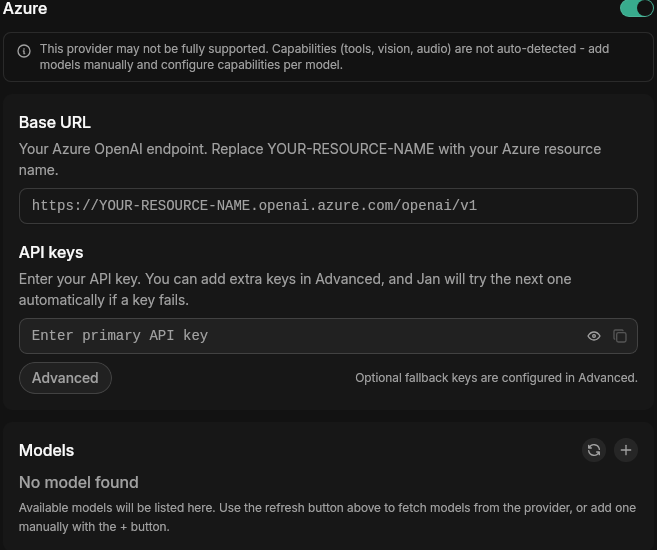
- Under Model Providers, select Azure
- Insert your API Key and set your Base URL to your Azure OpenAI resource endpoint (e.g.
https://YOUR-RESOURCE-NAME.openai.azure.com/openai/v1)
Step 3: Start Using Azure Models
- In any existing Chat or create a new one
- Select an Azure model from model selector
- Start chatting
Troubleshooting
1. API Key Issues
- Verify your API key is correct and not expired
- Check if your Azure resource has the model deployment active
2. Connection Problems
- Check your internet connection
- Verify the Base URL matches your Azure resource endpoint exactly
- Look for error messages in Jan's logs
Need more help? Join our Discord community (opens in a new tab) or check the Azure OpenAI documentation (opens in a new tab).