
Jan-v2-VL
Jan-v2-VL is an 8B vision-language model built on Qwen3-VL-8B-Thinking, designed for long-horizon, multi-step agentic tasks in real software environments — browsers, desktop apps, and beyond. It combines language reasoning with visual perception to execute stable, many-step automation chains with minimal drift.
Open in Jan
Variants
Jan-v2-VL comes in three variants tuned for different latency/quality tradeoffs:
| Variant | Focus |
|---|---|
| Jan-v2-VL-low | Efficiency-oriented, lower latency |
| Jan-v2-VL-med | Balanced latency and quality |
| Jan-v2-VL-high | Deeper reasoning, higher think time |
Capabilities
- Agentic automation & UI control: Follow complex multi-step instructions in browsers and desktop apps
- Screenshot grounding: Perceive and act on visual state of the screen
- Tool calling: Native support for BrowserMCP and similar integrations
- Error recovery: Maintain intermediate state and recover from minor execution errors
- Long-horizon execution: Stable performance across many-step automation chains
Performance
Long-Horizon Execution
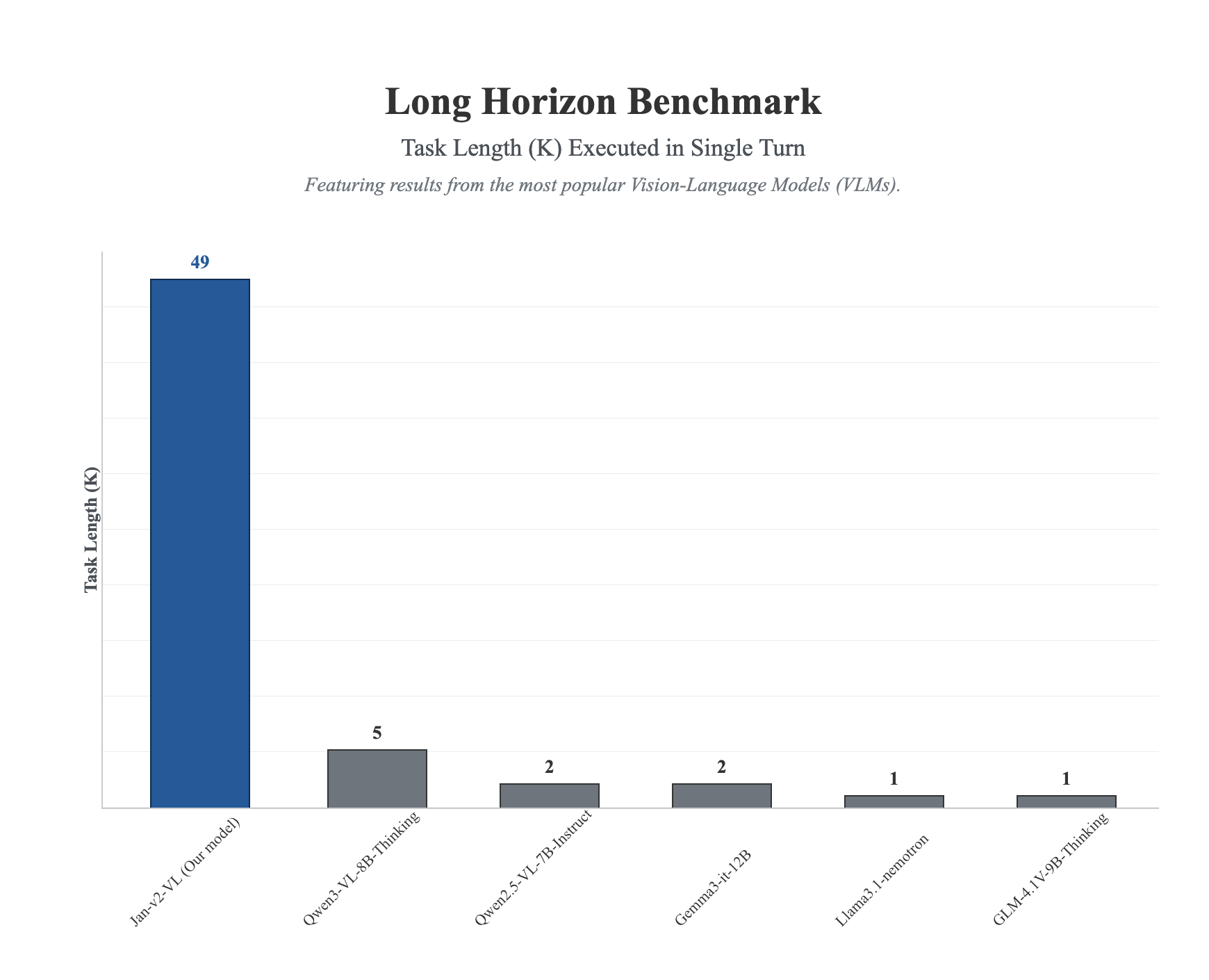
Jan-v2-VL dramatically outperforms competing VLMs on the long-horizon benchmark, completing tasks up to 49 steps in a single turn — nearly 10x more than the next best model.
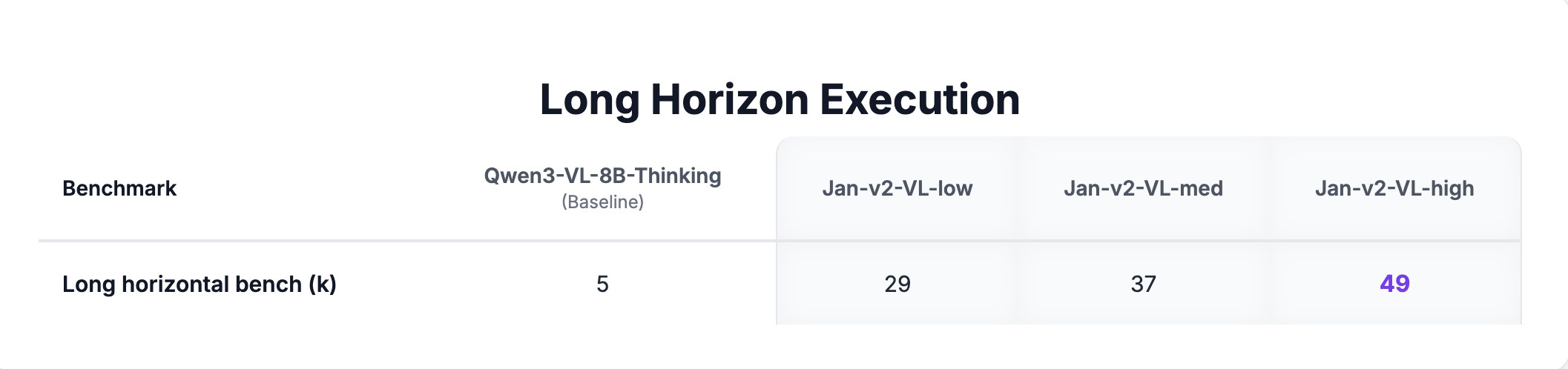
All three Jan-v2-VL variants significantly exceed the Qwen3-VL-8B-Thinking baseline (score: 5):
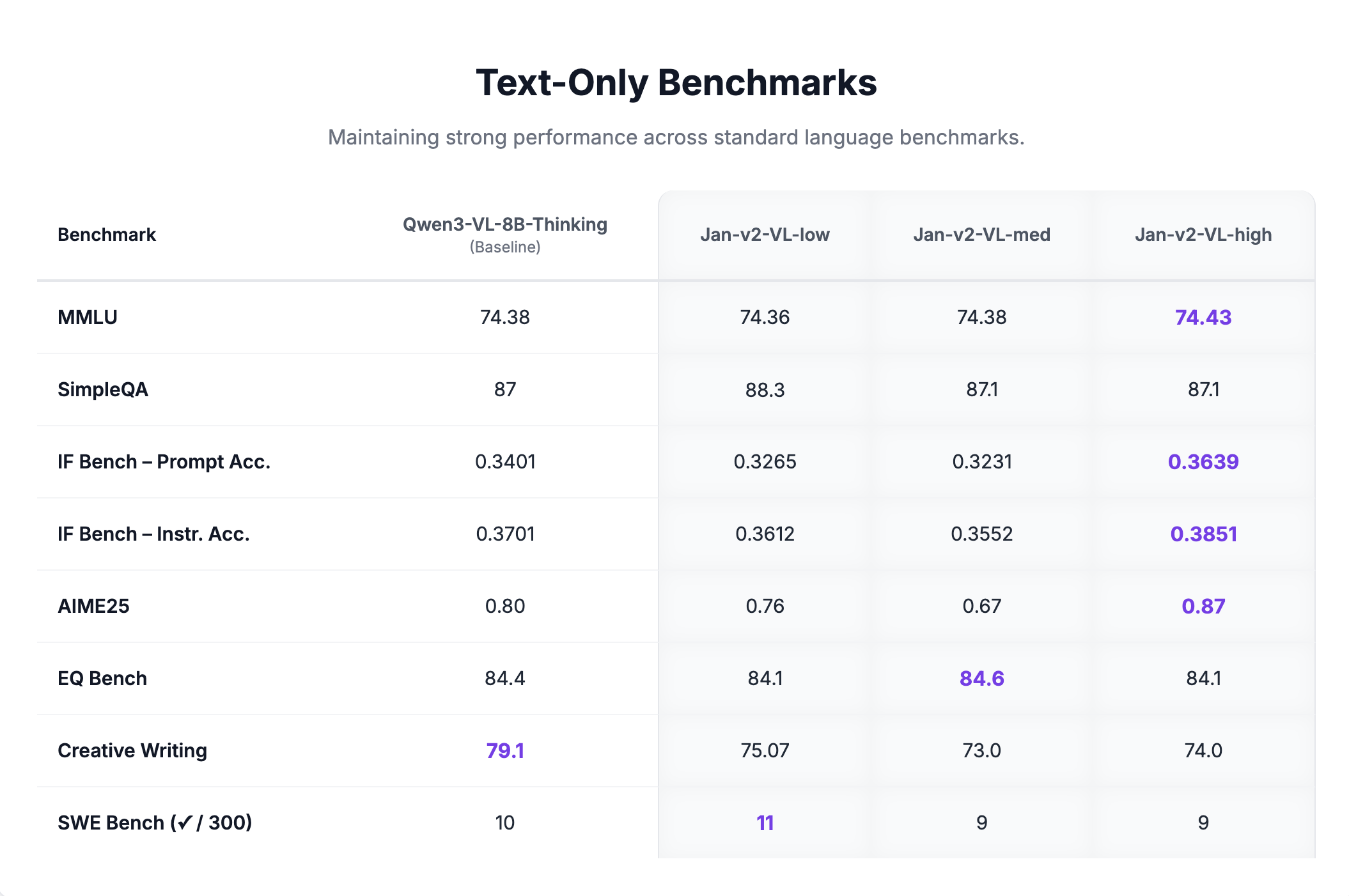
Text-Only Benchmarks
Jan-v2-VL maintains strong performance on standard language benchmarks with no degradation from the base model:
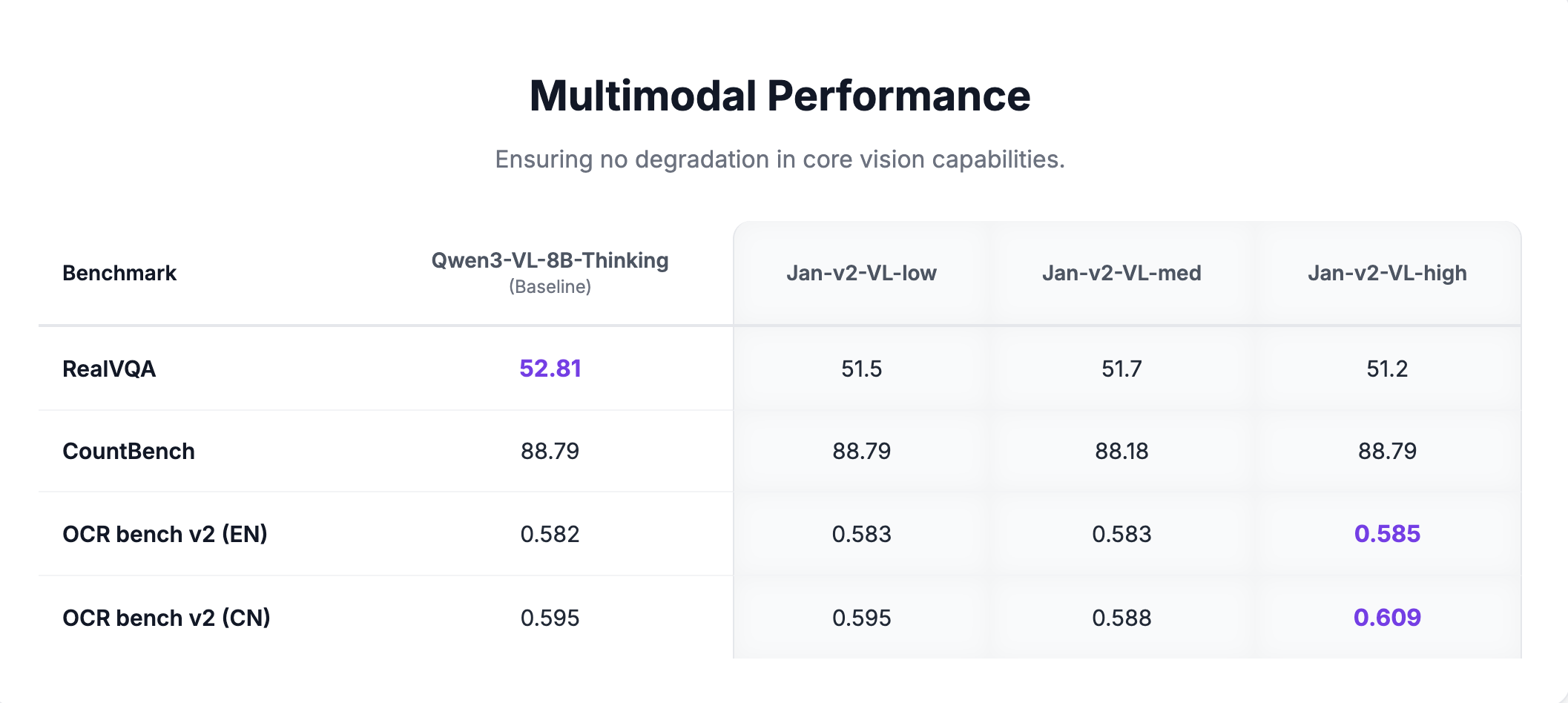
Multimodal Benchmarks
Core vision capabilities are fully preserved across all variants:
Requirements
- Memory:
- Minimum: 16GB RAM (with Q4 quantization)
- Recommended: 24GB RAM (with Q8 quantization)
- Hardware: GPU recommended for real-time agentic use
- API Support: OpenAI-compatible at localhost:1337
Using Jan-v2-VL
Quick Start
- Download Jan Desktop
- Click Open in Jan above, or open the Hub and search for Jan-v2-VL
- Choose Jan-v2-VL-med or another variant that fits your hardware, then click Download
- Once downloaded, select the downloaded Jan-v2-VL variant from the model selector in any chat
- Start using it for browser automation or visual tasks
Deployment Options
Using vLLM:
vllm serve janhq/Jan-v2-VL-high \ --host 0.0.0.0 \ --port 1234 \ --enable-auto-tool-choice \ --tool-call-parser hermes \ --reasoning-parser qwen3
Using llama.cpp:
llama-server --model Jan-v2-VL-high-Q8_0.gguf \ --vision-model-path mmproj-Jan-v2-VL-high.gguf \ --host 0.0.0.0 \ --port 1234 \ --jinja \ --no-context-shift
Recommended Parameters
temperature: 1.0top_p: 0.95top_k: 20repetition_penalty: 1.0presence_penalty: 1.5
What Jan-v2-VL Does Well
- UI automation: Navigate and interact with browsers and desktop applications via screenshots
- Long-horizon tasks: Execute multi-step plans without losing context or drifting
- Visual grounding: Identify and interact with specific UI elements from screenshots
- Tool calling: Integrate with MCP servers like BrowserMCP for end-to-end automation
Limitations
- GPU recommended: Real-time agentic use benefits significantly from GPU acceleration
- 8B size: More capable than 4B models for visual tasks, but larger resource footprint
- Vision required: Text-only tasks do not benefit from the vision-language architecture
Available Formats
GGUF Quantizations
- Q4_K_M: Good balance of size and quality
- Q5_K_M: Better quality, slightly larger
- Q8_0: Highest quality quantization
Models Available
- Jan-v2-VL-low on Hugging Face (opens in a new tab)
- Jan-v2-VL-med on Hugging Face (opens in a new tab)
- Jan-v2-VL-high on Hugging Face (opens in a new tab)
Community
- Discussions: HuggingFace Community (opens in a new tab)
- Support: Available through Jan App at jan.ai (opens in a new tab)